
Free Lowe's Receipt Generator & Template
Create a realistic Lowe's receipt in minutes with our free receipt maker. Customize items, prices, taxes, and store details — then download a clean, high-quality receipt for records, bookkeeping, or customer documentation.
- Pre-configured with all essential sections
- Fully customizable items, prices, and details
- Perfect for records, documentation, and mockups
- Thermal receipt format (80mm)
Acceptable use. Receipts created here are editable samples for lawful purposes — personal record-keeping, replacing a lost or faded receipt, mockups, testing, and education. Lowe's and any other brand names and logos are trademarks of their respective owners, referenced here for identification only; this tool is not affiliated with or endorsed by them. Do not use a generated receipt to misrepresent a real transaction, prove authenticity, impersonate a business, or deceive anyone. See our Acceptable Use Policy.
Template Features
Everything you need to create professional receipts with 24 customizable sections
24 Customizable Sections
Complete control over every element from logo to price match guarantee messaging.
Familiar Lowe's Layout
Laid out in the familiar Lowe's style with a clean, readable format.
Chip Payment Details
Full VISA chip transaction data including auth codes, REFID, and TVR information.
Product SKU Numbers
Include realistic product SKU codes and descriptions for building materials and tools.
High-Resolution Export
Download in crisp PNG or JPEG formats perfect for printing and digital use.
No Watermarks
Professional receipts without watermarks or branding on your output.
Unlimited Items
Add as many hardware, lumber, paint, and building supply items as needed.
Completely Free
No costs, no subscriptions, no sign-up required. Generate unlimited receipts.
How to Create Your Lowe's Receipt
Generate professional Lowe's receipts in just 3 simple steps
Select Template
Choose the Lowe's receipt template from our collection of professional templates.
Customize Details
Add your custom items, prices, store information, and receipt details in real-time.
Download Receipt
Generate and download your Lowe's receipt as a high-quality PNG or JPEG image.
Use Cases & Applications
Discover how professionals use this receipt template
Contractor Material Billing
Document building material purchases for client invoicing and project cost tracking.
Home Renovation Expenses
Track home improvement purchases for renovation budgets and insurance claims.
Business Expense Reports
Create records of hardware and supply purchases for business reimbursement.
Property Maintenance Records
Maintain detailed records of maintenance supplies and repair materials purchased.
POS System Testing
Test retail point-of-sale systems with realistic home improvement store receipts.
Tax Deduction Documentation
Document deductible home office and rental property improvement purchases.
About the Lowe's Receipt Template
A Lowe's receipt is the printed record of a home-improvement purchase — the itemized building supplies, the tax and total, the card authorization, and the store and terminal codes that let the service desk look the sale up for a return. Lowe's is one of the largest home-improvement chains in the United States, so its receipt is a format many contractors and homeowners handle often. This template reproduces that layout section by section, and you fill it in with your own store, items, and totals. It is useful for rebuilding a faded receipt before billing a client, tracking a renovation budget, or filing an insurance or tax record. Every value shown below is an editable example, not a real transaction.
Store header
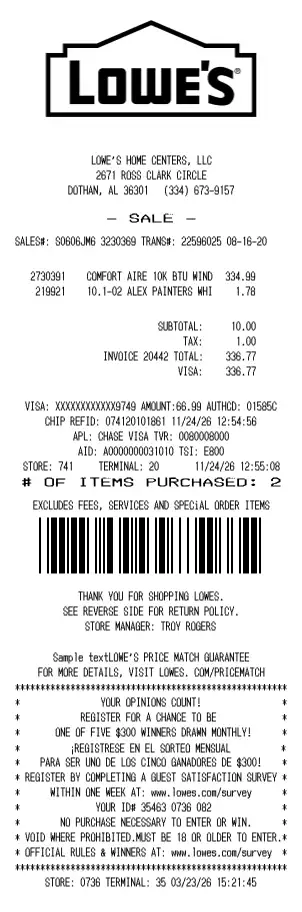
Under the Lowe's logo the receipt centers the store block — the legal store name, the street address, and the city, state, and phone (LOWE'S HOME CENTERS, LLC, 2671 ROSS CLARK CIRCLE, DOTHAN, AL 36301 (334) 673-9157) — followed by a - SALE - banner. Each field is yours to set.
Sale and transaction line
A single line carries the codes the register and returns desk use to identify the purchase: the sales and transaction numbers with the date, for example SALES#: S0606JM6 3230369 TRANS#: 22596025. These tie the paper receipt back to the store system.
Item lines with SKUs
Items print with a quantity or SKU number, a clipped product description, and a price — such as COMFORT AIRE 10K BTU WIND under SKU 2730391, or 10.1-02 ALEX PAINTERS WHI at 1.78. Add as many hardware, lumber, paint, and building-supply lines as the purchase needs.
Totals and card tender
The totals block stacks the subtotal, tax, and invoice total, then the tendered card — SUBTOTAL 10.00, TAX 1.00, INVOICE 20442 TOTAL 336.77, VISA 336.77. The rate and tender type are editable.
Chip authorization block
Card sales print the EMV chip details a Lowe's terminal records: a masked card number and amount (VISA: XXXXXXXXXXXX9749), an authorization code (AUTHCD: 01585C), the chip reference (CHIP REFID: 074120101861), the application label and identifier (APL: CHASE VISA, AID: A0000000031010), and the terminal-verification codes (TVR: 0080008000, TSI: E800). These are sample values you can overwrite.
Store footer, returns and survey
The foot of the receipt prints the store and terminal identifiers (STORE: 741 TERMINAL: 20), an item count, a CODE39 barcode, the returns notice with the store manager's name, the price-match guarantee line, and a guest-satisfaction survey box with an entry ID. Any of these lines can be edited or removed.
A note on responsible use. Receipts you create here are your own documents, meant for records, expense tracking, testing, teaching, and design mockups. They should not be used to misrepresent a purchase that did not happen or to imply endorsement by Lowe's.
Open the Lowe's template, edit any section, and export a print-ready PNG or JPEG. It is free to use; a Pro upgrade removes the watermark.
Frequently Asked Questions
Everything you need to know about the Lowe's receipt template
Related Templates
Explore more professional receipt templates
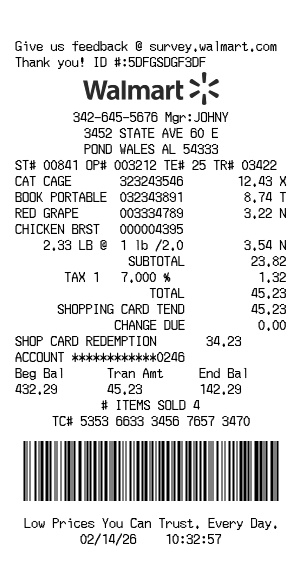
Walmart
RetailFree Walmart receipt generator with logo, itemized list, barcode, totals, and clean store-style formatting

Balenciaga
RetailPremium fashion retail receipt with itemized luxury products, sales tax analysis, and barcode
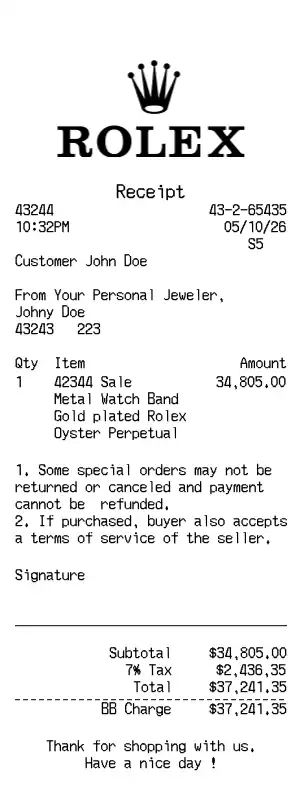
Rolex
RetailLuxury watch retailer receipt with premium timepiece details, warranty information, and payment breakdown